Information gathering is the most critical phase of any penetration test. Before a security professional ever attempts an exploit, they must first understand the “digital footprint” of their target. This process, often called Open Source Intelligence (OSINT), involves collecting publicly available data such as employee emails, usernames, and server configurations.
In this guide, we will demonstrate how to use three powerful tools—theHarvester, Redhawk, and Sherlock—to perform advanced reconnaissance within your ethical hacking lab. This process should be done on your hacking lab which you can do by learning how to install Kali Linux and Virtual box.
If you are a visual person you can watch the video tutorial below:
Understanding OSINT and Information Gathering
Reconnaissance is divided into two categories: passive and active. Passive reconnaissance involves gathering data without interacting directly with the target’s servers, while active reconnaissance (like scanning) involves direct interaction. By extracting emails and usernames, you create a map of potential targets for social engineering or credential testing.
OSINT with theHarvester

theHarvester is a classic tool used to gather emails, subdomains, hosts, employee names, open ports, and banners from different public sources like Google, Bing, LinkedIn, and more.
How to use theHarvester
Before running complex commands, it is best to view the help menu to understand the available flags and data sources. Run the following command in the terminal of your ethical hacking lab:
theHarvester --helpTo start gathering data from a specific domain using a search engine like Yahoo, use the following syntax:
theHarvester -d testphp.vulnweb.com -b yahooIf you want theHarvester to crawl all available data sources to provide a comprehensive list of emails and subdomains, run:
theHarvester -d testphp.vulnweb.com -b all
Using Redhawk for Advanced Information Gathering
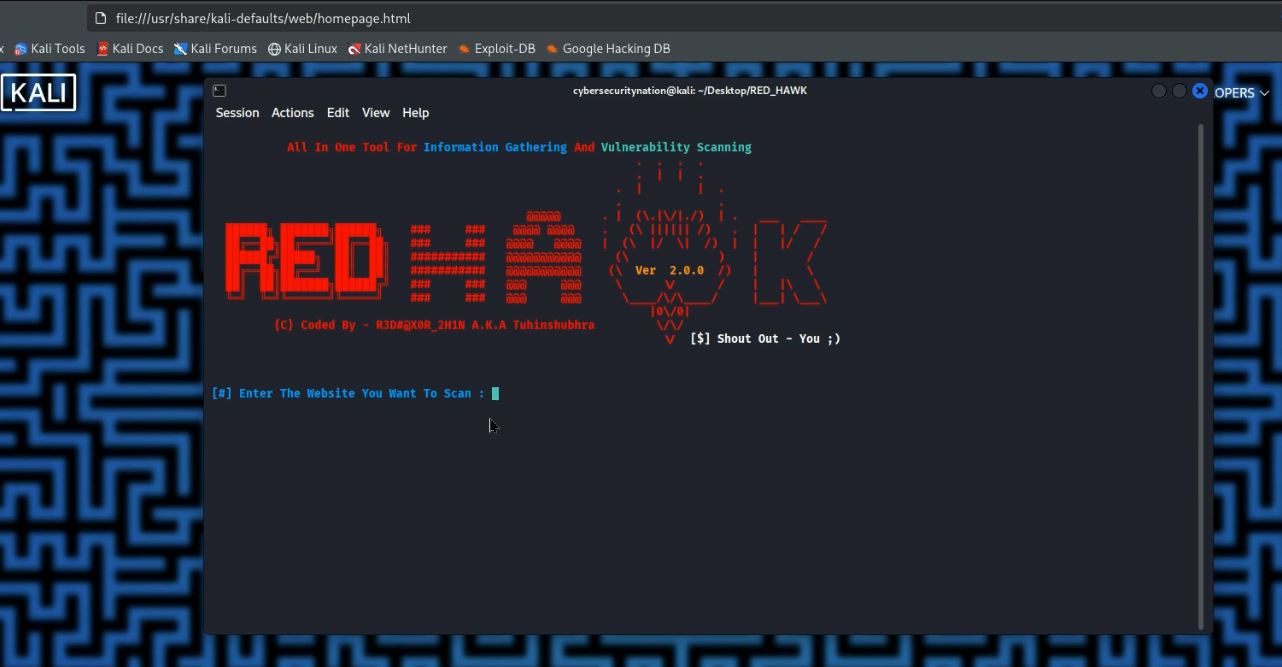
While theHarvester is great for broad OSINT, Redhawk is an all-in-one tool for web reconnaissance. Written in PHP, it provides everything from WHOIS lookups to Cloudflare detection.
Downloading and Installing Redhawk
When downloading tools, always ensure you are using a reliable source. Go to Google.com and search for “information gathering tools github” to find the official repositories. Once you have identified the Redhawk repository, follow these steps to install it on your Kali Linux Desktop:
- Copy the Download Link: Navigate to the Redhawk GitHub page and copy the HTTPS clone URL.
- Open your Terminal: Navigate to your Desktop to keep your workspace organized.
- cd Desktop/
- Clone the Repository: Type the following command and use Ctrl+Shift+V to paste the link:
git clone https://github.com/Tuhinshubhra/RED_HAWK.gitRunning Redhawk in the Lab

To launch the tool, navigate into the newly created directory:
- cd Red_hawk/
- ls (You will see rhawk.php in the list)
Execute the tool using the PHP interpreter:
php rhawk.phpNote: If this is your first time running Redhawk, the tool might prompt you to fix dependencies. Simply type fix and press Enter.
The Scan Process:
- Enter the Website you want to scan (e.g., itsecgames.com).
- Specify the protocol: Enter 1 for HTTP or 2 for HTTPS.
- Choose your scan type. Redhawk offers options 1 through 13.
- Option 0 (Basic Recon): Pulls Site Title, IP Address, CMS detection, and scans for robots.txt.
- Option 1 (WHOIS Lookup): Gathers registration data about the domain.

4. Choose any Scan or Option from the list to continue. You can type number 0 for basic recon.

5. Scan Result

Important Note: Some advanced features in Redhawk may require a membership plan. However, the cybersecurity community is built on open-source sharing. As a gift to our #cybersecurenation community, I have coded a custom Python script for extracting emails on ethical hacking lab which I will be sharing soon! Subscribe to our blog and YouTube channel to get notified when the script is released.
How to Find Usernames with Sherlock
Once you have extracted a potential username from an email or a web scan, the next step is to see where else that user exists on the internet. Sherlock is a powerful tool that hunts down social media accounts across hundreds of platforms using a single username.
Installing Sherlock on your Ethical Hacking Lab
- Search Google for “Sherlock GitHub” and read the documentation to ensure compatibility.
- Copy the HTTPS link from the “Code” button.
- In your terminal, navigate to your Desktop:
- cd Desktop/
- Clone the repository:
- Navigate into the folder and install the requirements:
- cd sherlock
- pipx install sherlock-project (This is the modern way to install Python tools globally on Kali).
Running a Sherlock Search

To understand the full capabilities of the tool, run:
sherlock --helpTo hunt for a specific username across the web, use the following command (replace “topguest” with the username you discovered during your recon phase):
sherlock topguestSherlock will now scan hundreds of sites (Twitter, Facebook, Instagram, GitHub, etc.) and provide you with direct URLs to the accounts associated with that name.
Conclusion and Ethical Warning
Extracting emails and usernames is a foundational skill for any ethical hacker. Tools like theHarvester, Redhawk, and Sherlock make the OSINT process efficient, but they must be used responsibly. Always ensure you have permission to test the domains you are targeting.
Setting up your hacking lab and mastering these tools is the first step toward a career in cybersecurity. Don’t forget that we are constantly releasing new tools and scripts to help you stay ahead of the curve.
Did you find this guide helpful? What is your favorite OSINT tool for 2025? Let us know in the comments below, and don’t forget to like and share this post with your fellow researchers!






Leave a Reply